
I got shopperpress as a feature rich ecommerce theme for wordpress. I have been using this theme for a few projects. Now I am developing an amazon affiliate site where there will be no option of add to cart. The site will function just as an informational site & there will be a button linked to amazon.
However, The buy button is available with Shopperpress by default but the problem I was having is the add to cart button was also showing there as well as Amazon buy now button. I checked for any option to hide the add to cart button but I couldn’t find any. For why I started analyzing the code & fixed the problem.
I think many others are also having this problem & this tutorial may save a lot of time of them. So, I am sharing how to remove Add to cart Button in Shopperpress. Let’s do it :
1) Open Shopperpress >> template_shopperpress >> system_customdesign.php in your editor.
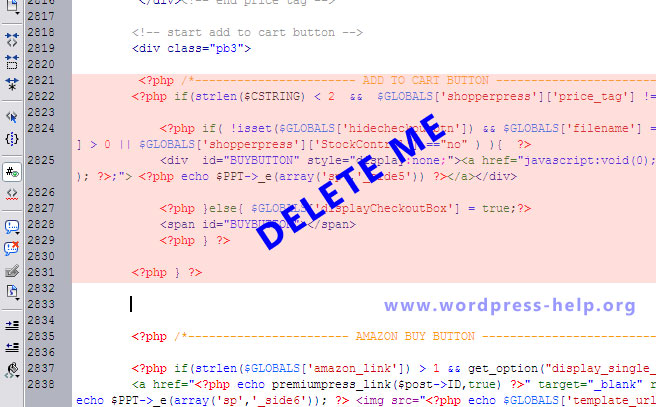
2) Find the code given below & remove those :
3) Save & Upload the file. You will now see only amazon buy button ..
Here is the final output :

And we’re done.
This way we removed the add to cart button & kept only amazon buy button in shopperpress wordpress theme.
Thanks

One response to “Remove Add To Cart Link from single product page in ShopperPress”
Thank you, it works for me 🙂